 Cribyard
Start with what
needs a decision.
Quotes needing sign-off. Tickets waiting for review. Overdue balances. Tasks and credentials that need attention.
Built for the work around the lift
Big jobs take more than heavy iron.
Give your people one place to quote, plan, dispatch, capture the work and get it billed.
Operations software for millwright, rigging,
machinery-moving and heavy-lift contractors.
Sign-offs, tickets, dispatch gaps and money to follow up.
See your team’s view ↗ Heavy work.
01 / From the first number to the final bill
The quote sets the plan. The job holds the work. The field tells the office what happened. Each handoff carries the details forward.
Estimate labour, equipment, materials and subcontracts by phase. Compare cost and sell and check the margin before the proposal goes out.
The details travel with the job. Customer, site, scope, priced phases, documents and history stay connected as the work changes hands.
Now take it to site ↓02 / In the field
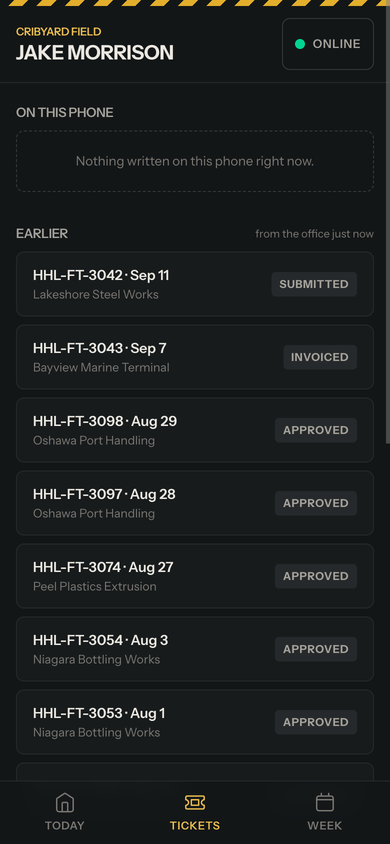
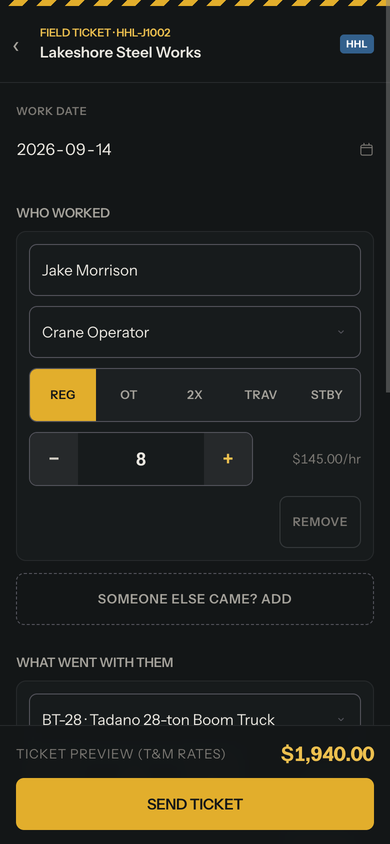
The crew already did the heavy lifting. Give them a ticket that starts with the people and equipment on the booking.
Start from the booking.
Crew and iron arrive on the ticket. Adjust what actually happened.
Capture it while it’s fresh.
Hours, materials, photos and a customer signature, all from the phone.
Keep going when the signal drops.
Draft on the device and sync when connected. See when a submission needs attention.
03 / Back in the office
Turn approved tickets into invoices and paid hours. Keep purchasing, receiving and customer balances alongside the jobs they belong to.
Review and approve the work, bill tickets or milestones, and track payments, deposits and customer balances.
Review the work, then bill it · Click to enlarge ↗
04 / For the person watching the margin
A full dispatch board tells you the shop is working. Job costing tells you what that work is costing, earning and leaving unbilled.
Same job. Four different questions.
See each answer while the job is still open.
Changing next month’s rate book doesn’t rewrite last month’s work. Cost and sell rates are stored with the document.
Shop pulse, job reports, work in progress, sales, billing, employee hours, timesheets, inventory and deposits. Filter the report and take it to CSV.
05 / One shop, different working days
The owner, the dispatcher and the crew need different things first. Cribyard’s workspace follows the work each person does.
Quotes needing sign-off. Tickets waiting for review. Overdue balances. Tasks and credentials that need attention.
See the week by crew, by iron or by job. Find missing people, pending acceptances and scheduling conflicts.
Look at dispatch ↗Bookings, crew and equipment on the phone. Tickets and their status. Weekly hours to review and confirm.
Look at the field app ↗Share a crew and equipment pool across your operating companies. Keep company-specific documents and numbering, with an overview across the entities you can access.
Separate operating companies. One place to see the work.
Start with your shop
Set up the people, equipment, customers and rate books that make the software useful. Then walk one real job through with the office and the crew.
We help prepare your customers, sites, crew, equipment and rates for the move. Review what will come in before it lands. Setup scope is agreed around your data and your first job.
06 / The price belongs on the page
Choose your field-crew band. Everyone can have a login, with no extra charge for each office user, dispatcher or crew member.
HOW MANY PEOPLE ARE IN YOUR FIELD CREW?
Additional operating companies: $400/month each.
All prices in USD. Setup scope and charges agreed before starting.
1 operating company included · Unlimited logins
Find the fit for your crew and operating companies.
A few good questions
No. Cribyard is built around heavy-lift, rigging, millwright and machinery-moving work: quoting labour and equipment, managing jobs and work orders, dispatching resources and billing the work.
Yes. Approved T&M tickets can be invoiced individually or batched by job. Contract work can use milestone and progress billing. The job keeps the field record alongside its billing history.
Cribyard prepares approved hours for payroll CSV export and provides a general-ledger export after account mapping. Your payroll system still holds pay rates and runs payroll. Direct accounting sync is planned and is not currently available.
The field app supports on-device ticket drafting and an outbox that syncs when connected. Open and sync the app before heading out; a first visit or a fresh sign-in needs a connection.
We can help bring in customers, contacts, sites, crew, equipment, materials and labour rates from exported files. Review the import before committing it. Job history is not currently included; we agree the move-in scope around your data.
Heavy work. Paperwork handled.
Let’s walk through a job with your office and your crew.
Talk about your shop ↗